Google 登录迁移到Credential Manager
接入文档 https://developer.android.com/identity/sign-in/credential-manager-siwg#siwg-button
接入依赖
1
2
3
    implementation "androidx.credentials:credentials:1.5.0"
    implementation "androidx.credentials:credentials-play-services-auth:1.5.0"
    implementation "com.google.android.libraries.identity.googleid:googleid:1.1.1"
最新版本https://developer.android.com/jetpack/androidx/releases/credentials
注意:在 Firebase 中为当前项目添加登录方式,另外 keystore 指纹 sha1和 sha256 需要和 Google Play Console 中的一致! 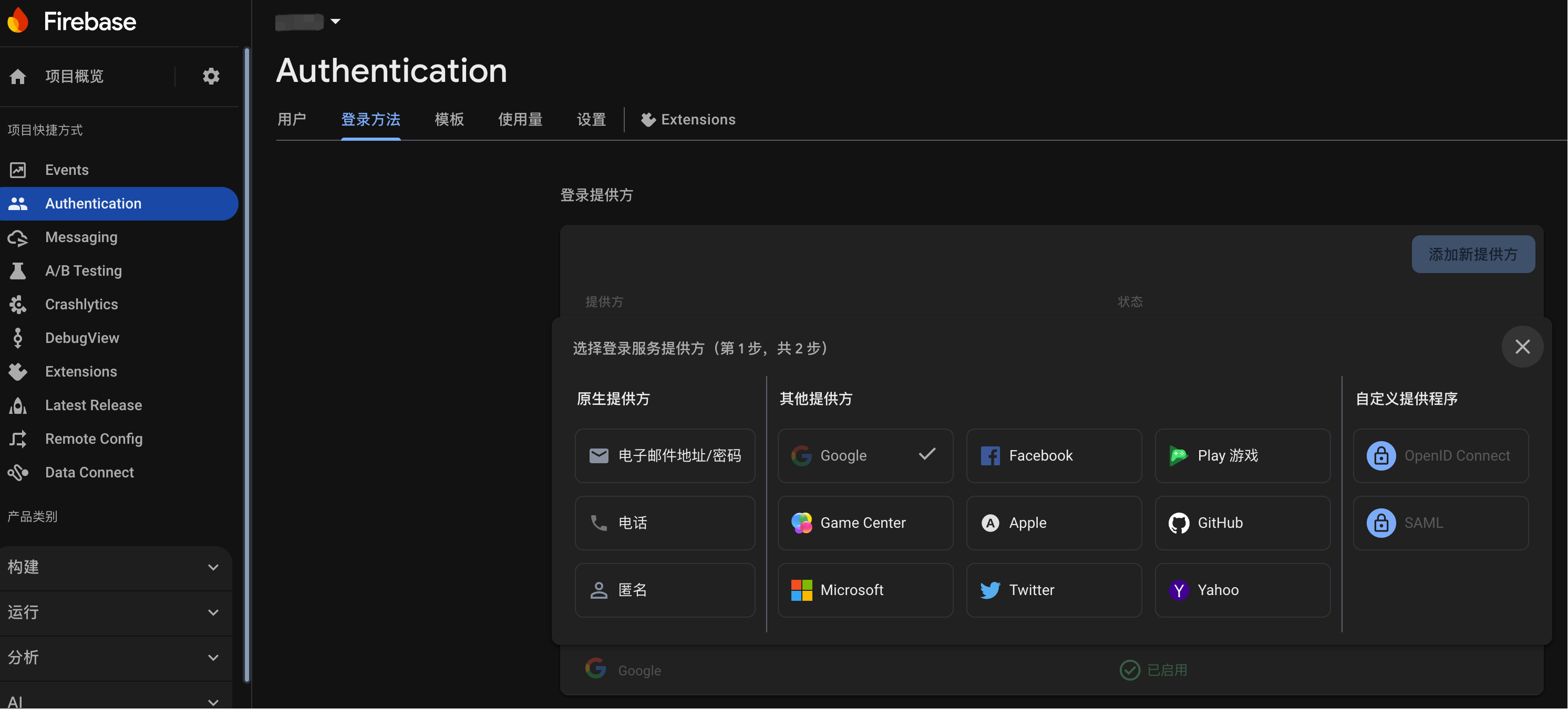
接入代码如下
1
2
3
4
5
6
7
8
9
10
11
12
13
14
15
16
17
18
19
20
21
22
23
24
25
26
27
28
29
30
31
32
33
34
35
36
37
38
39
40
41
42
43
44
45
46
47
48
49
50
51
52
53
54
55
56
57
58
59
60
61
62
63
64
65
66
67
68
69
70
71
72
73
74
75
76
77
78
79
80
81
82
83
84
85
86
87
88
89
90
91
92
93
94
95
96
97
98
99
100
101
102
103
104
105
106
107
108
109
110
111
suspend fun login(activity: Activity, googleClientId: String, type: BindType) {
    // 检查Google Play Services可用性
    if (!checkGooglePlayServices(activity)) {
        return
    }
    credentialManager = CredentialManager.create(activity)

    try {
        LogUtils.i(TAG, "尝试显示所有可用账户...")
        val fallbackResult = tryLoginWithAllAccounts(activity, googleClientId)
        if (fallbackResult != null) {
            LogUtils.i(TAG, "所有账户选择登录成功")
            handleSignIn(fallbackResult)
        }
    } catch (e: GetCredentialException) {
        LogUtils.e(TAG, "所有登录尝试均失败: ${e.message}")
        handleLoginFailure("google", "Google login failed type:${e.type}: errorMessage:${e.message}")
    }
}


private suspend fun tryLoginWithAllAccounts(
        activity: Activity,
        googleClientId: String
    ): GetCredentialResponse? {
        val googleIdOption = GetGoogleIdOption.Builder()
            .setFilterByAuthorizedAccounts(false) // 显示所有可用账户
            .setServerClientId(googleClientId)
            .setAutoSelectEnabled(false) // 禁用自动选择,让用户手动选择
            .build()

        val request = GetCredentialRequest.Builder()
            .addCredentialOption(googleIdOption)
            .build()

        return try {
            credentialManager.getCredential(
                request = request,
                context = activity,
            )
        } catch (e: GetCredentialException) {
            LogUtils.e(TAG, "Google Login GetCredentialException type:${e.type} errorMessage: ${e.message}")
            handleLoginFailure("google",e.type)
            null
        }
    }

    //Google 授权回调
    fun handleSignIn(result: GetCredentialResponse) {
        // Handle the successfully returned credential.
        val credential = result.credential
        val responseJson: String

        when (credential) {
            // Passkey credential
            is PublicKeyCredential -> {
                // Share responseJson such as a GetCredentialResponse to your server to validate and
                // authenticate
                responseJson = credential.authenticationResponseJson
            }

            // Password credential
            is PasswordCredential -> {
                // Send ID and password to your server to validate and authenticate.
                val username = credential.id
                val password = credential.password

            }

            // GoogleIdToken credential
            is CustomCredential -> {
                if (credential.type == GoogleIdTokenCredential.TYPE_GOOGLE_ID_TOKEN_CREDENTIAL) {
                    try {
                        // Use googleIdTokenCredential and extract the ID to validate and
                        // authenticate on your server.
                        val googleIdTokenCredential = GoogleIdTokenCredential
                            .createFrom(credential.data)
                        // You can use the members of googleIdTokenCredential directly for UX
                        // purposes, but don't use them to store or control access to user
                        // data. For that you first need to validate the token:
                        // pass googleIdTokenCredential.getIdToken() to the backend server.
                        // see [validation instructions](https://developers.google.com/identity/gsi/web/guides/verify-google-id-token)
                        val idToken = googleIdTokenCredential.idToken
                        val displayName = googleIdTokenCredential.displayName
                        val id = googleIdTokenCredential.id

                    } catch (e: GoogleIdTokenParsingException) {
                        handleLoginFailure("google", "Invalid Google ID token: ${e.message}")
                    }
                } else {
                    // Catch any unrecognized custom credential type here.
                    LogUtils.e(TAG, "Unexpected type of credential: ${credential.type}")
                    handleLoginFailure("google", "Unexpected credential type: ${credential.type}")
                }
            }

            else -> {
                // Catch any unrecognized credential type here.
                handleLoginFailure("google", "Unrecognized credential type")
            }
        }
    }


    //logout
    suspend fun logout(context: Context) {
        val request =
            ClearCredentialStateRequest(ClearCredentialStateRequest.TYPE_CLEAR_RESTORE_CREDENTIAL)
        credentialManager.clearCredentialState(request)
    }
参考链接
常见错误代码和描述 https://developer.android.com/identity/sign-in/credential-manager-troubleshooting-guide
Android Credential Manager API https://developers.google.com/identity/android-credential-manager
Troubleshoot common Credential Manager errors
https://developer.android.com/identity/sign-in/credential-manager-troubleshooting-guideicon 图制作
https://fonts.google.com/
Important! Not meeting these requirements can slow down the verification process. Please make sure your homepage has met the above criteria before including it in your submission.重要提示! 不满足这些要求可能会减慢验证过程。请确保您的首页符合上述标准,然后再将其添加到提交内容中。 https://support.google.com/cloud/answer/13807376?hl=zh-Hans
使用 Google 账号授权过的第三方应用 https://myaccount.google.com/connections
Firebase 本身提供的登录验证(注意每日有限额,超出限额会有费用) https://firebase.google.com/docs/auth Firebase 提供的代码仓库示例 https://github.com/firebase/snippets-android